
A Cowork workbench
in your browser.
No desktop install, no command-line learning curve — one cc ui brings up a full workbench.
10 task templates cover everyday high-frequency scenarios. Describe what you need in natural language; the agent installs tools, runs the flow, and streams results back.
# 1. Install the CLI (one-time)
npm i -g chainlesschain@0.162.197

# 2. Start the web panel
cc ui

# 3. Open in browser
# → http://localhost:18810/#/cowork
HTTP port 18810, WebSocket port 18800, both bound to localhost.
Service runs on your machine — no account, no cloud, no telemetry.
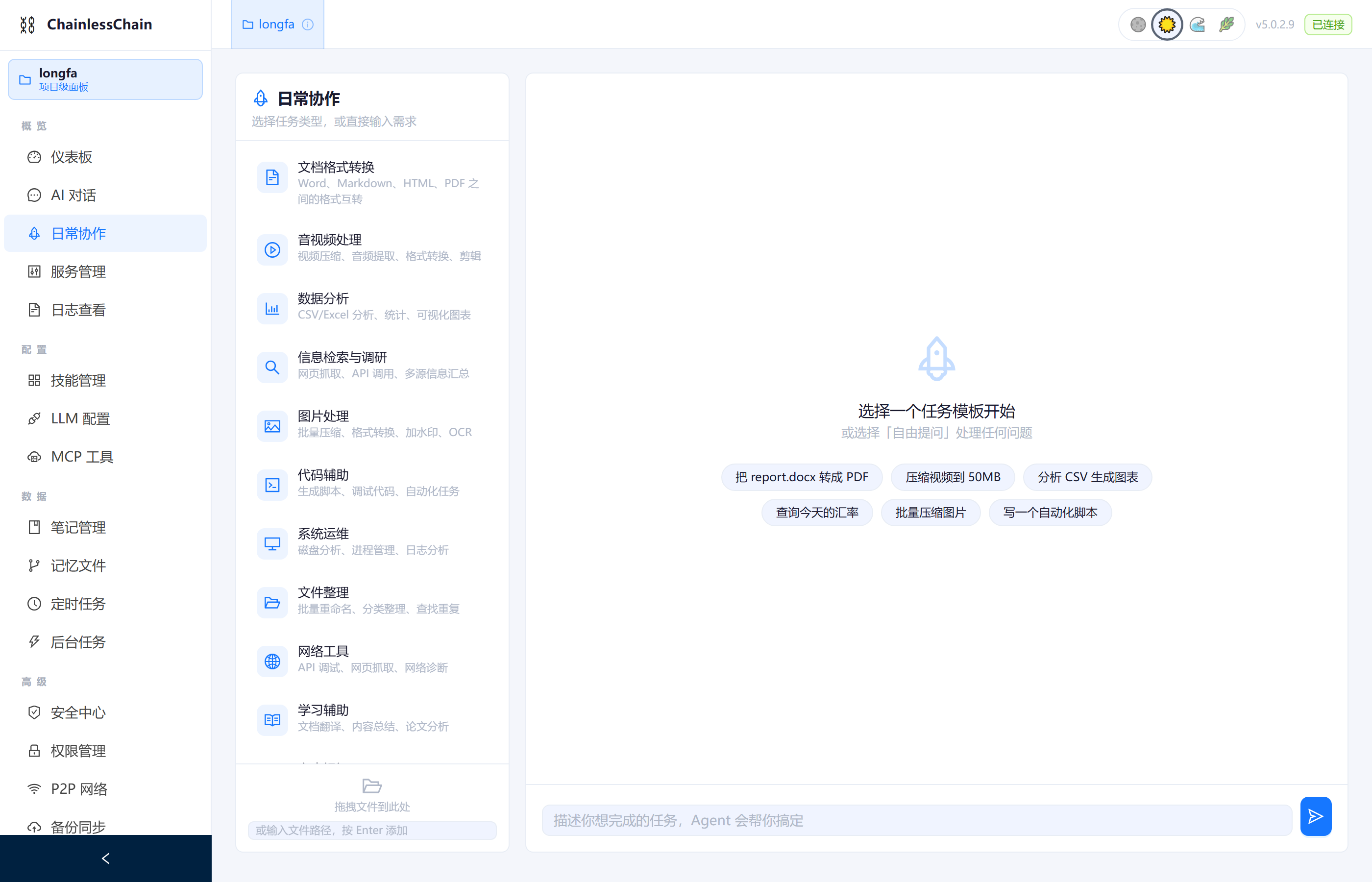
Web Cowork · task templates + streaming progress
High-frequency scenarios, ready out of the box.
Each template is a pre-configured toolchain + prompt. Pick a template → describe your need → agent installs deps, runs the flow, returns results. No commands to remember, no flags to tune.
Document Conversion
Batch Word → PDF, Word ↔ Markdown, PPT → images
Audio / Video
Compress video, extract audio, edit & splice, transcode
Data Analysis
CSV / Excel statistics, chart generation, pivot summaries
Web Research
Auto-scrape pages, summarize key points, generate report
Image Processing
Batch compress, transcode, OCR text extraction
Code Helper
Script generation, code review, refactoring suggestions
System Admin
Disk analysis, process audit, service management
File Organization
Batch rename, rule-based archiving, decompression
Network Tools
Port scan, DNS lookup, latency testing
Custom Task
Describe in natural language, agent orchestrates the toolchain
From one sentence to executed result.
Describe
Express what you want in natural language; no CLI syntax to learn.
Auto-orchestrate
Agent parses intent, picks templates, calls skills, orchestrates the toolchain.
Install on demand
Missing tool? winget / choco / pip / npm runs automatically.
Stream back
WebSocket pushes every step — you see progress, not just the final result.
The Web panel's full module set.
Cowork
10 task templates + natural-language description → auto-execution
AI Chat
Streaming chat + virtual list + intent recognition card (V5 desktop parity) + URL auto-send + project/file/global context modes
AIOps
Z-Score / IQR anomaly detection, incident state machine, auto playbooks
Skills
146 built-in skills, four-layer loading: marketplace / managed / workspace
Skill Marketplace
Publish skill services, track invocation stats, lifecycle state machine
Knowledge Graph
ECharts force-directed view, CRUD entities/relations, multi-hop BFS reasoning
Community
Contacts / friends / posts — decentralized social
Cross-chain Bridge
5-chain bridging + HTLC atomic swap + cross-chain messages + fee estimation
Compliance & Threat Intel
STIX 2.1 IoC matching + UEBA behavioral analytics + risk scoring
Privacy Computing
FL federated learning + MPC + DP differential privacy + HE homomorphic encryption
Inference Network
Node registry + task scheduling + privacy modes + resource allocation
NL Programming
Intent classification + entity extraction + translation + coding-convention governance
Multi-Tenant SaaS
4 plans + usage metering + quota checking + MRR computation
Pipeline Orchestrator
7-stage pipeline + deploy strategy + templates + gate stages
Community Governance
Proposals + weighted voting + impact analysis + prediction confidence
Audit Logs
Audit-event search / filter / export + compliance retention
Reputation Optimizer
exp/linear/step decay + anomaly detection + simulated Bayesian
Content Recommendation
Interest profiles + topic scoring + time decay + feedback loop
SLA Manager
Tier catalog + direction-aware deviation + p95 + compensation cap
Code Generation
Generation tracking + 5-rule security review + scaffold catalog
Token Incentive
Token ledger + 7 contribution types + leaderboard
Trust Root
Trust-root management + PQC interop + satellite transport + HSM
Federation Hardening
Circuit-breaker FSM + health checks + connection pool + node aggregation
DID Identity
Decentralized-identity create / sign / DID Document view
Agent Mode
Claude Code-style agentic loop — read/write files, run commands
System Settings
LLM Provider, Ollama, theme, config sync
Why pick the Web edition?
Browser-ready
No desktop installer, no Electron init. After the CLI is installed, cc ui brings up the service in one command.
localhost binding
HTTP / WebSocket bound to 127.0.0.1. Data, models, keys all stay on your machine — power down equals air-gap.
Consistent across targets
CLI / Web / desktop share the same skill set and configuration. The same skill behaves identically on every target — switch surfaces, not muscle memory.
One command, working in your browser.
No new tool to learn, no environment to configure, no account to register. Your machine, your data, your pace.